The Ultimate Podcast Gear Guide: Everything You Need To Start At Every Level
Over 619 million people worldwide now listen to podcasts, making it one of the fastest-growing content formats. In the US alone, more than half the population tunes to podcasts every month. Whether you're a business owner, a creative, or someone with a story to share, starting a podcast has never been more accessible and never more valuable.So, why haven’t you gotten started yet? If you have any hesitations, you should know that the barrier to entry is lower than most people think. The gear is straightforward to acquire, surprisingly simple to set up, and available at every budget level. After all, what separates a polished show from a forgettable one isn't access to expensive equipment; it's knowing which equipment matches where you are right now, and how to level up intentionally as you grow.
With this guide, we’ll steer you in the right direction on what’s needed to get started. We’ll walk you through exactly that, from a simple audio-only setup all the way to a full multi-camera video podcast production.
Understanding Podcast Equipment for Beginners
If you're launching an audio-only podcast, the good news is that your entire podcast microphone setup can cost you less than $100 and take about five minutes to configure. For this type of podcast, all you need is a USB microphone to get started. It plugs directly into your computer, which automatically recognizes it as a microphone input. You don’t need any additional software or any advanced technical knowledge.
USB microphones have come a long way in quality and are now perfectly capable of producing clean, professional-sounding audio suitable for podcasts.
This setup is genuinely all you need to launch, publish, and grow an audience. Many of the most successful podcasts in the world started with far less. Don't let gear be the reason you wait.
Related: Why Environment Matters for Content Creation — The Hive Studios
Scaling Your Audio: The Interface and XLR Setup
When you're ready to take your audio quality up a notch or when you want to bring a co-host or guest into the conversation, here’s your next step. Look for an audio interface paired with XLR microphones. This is where your podcast microphone setup gets meaningfully more powerful.
An audio interface acts as the bridge between your microphones and your computer. XLR refers to the type of cable that connects the microphone to the interface. It’s a professional-grade connection that delivers noticeably cleaner audio than USB. The interface then connects to your computer via USB, and your computer recognizes it as a microphone input.
The real advantage of this setup is control. With an audio interface, you can connect multiple microphones simultaneously, one per person, and independently adjust the volume level of each. This is especially useful if one speaker is naturally louder than another, or if you're recording with guests who aren't used to microphone positioning. You're no longer at the mercy of a single input. Every voice gets its own channel, its own level, and its own presence in the final mix.
Starting Your Video Podcast Setup
Video podcasting is no longer a suggestion for creators who want to maximize their reach. Video podcasts, in recent years, have been an addition to classic audio or text-only platforms, such as Spotify and Substack. Presently, YouTube has become the dominant platform for podcast consumption, capturing more than a third of weekly listeners in the US. If you're onlypublishing audio, you're leaving a significant portion of your potential audience on the table; in other words, you’re limiting your reach.
The first step in building a video podcast setup is getting off your laptop's built-in webcam. It is far too simplistic for the quality that’s needed to launch your video podcast well. Even an external USB-C webcam is a meaningful upgrade; the image quality and performance of a dedicated camera versus a built-in one is immediately noticeable to viewers.
If you want to take things a step further, a capture card is the next key piece of gear. A capture card converts the video signal from any mirrorless camera into a feed that your computer can recognize. The connection is straightforward: your camera's HDMI output goes into the capture card, and then the capture card connects to your computer via USB-C. Your computer then reads the camera as a standard video input, giving you the image quality of a dedicated camera but with added simplicity.
The Full Setup: A Multi-Camera Production
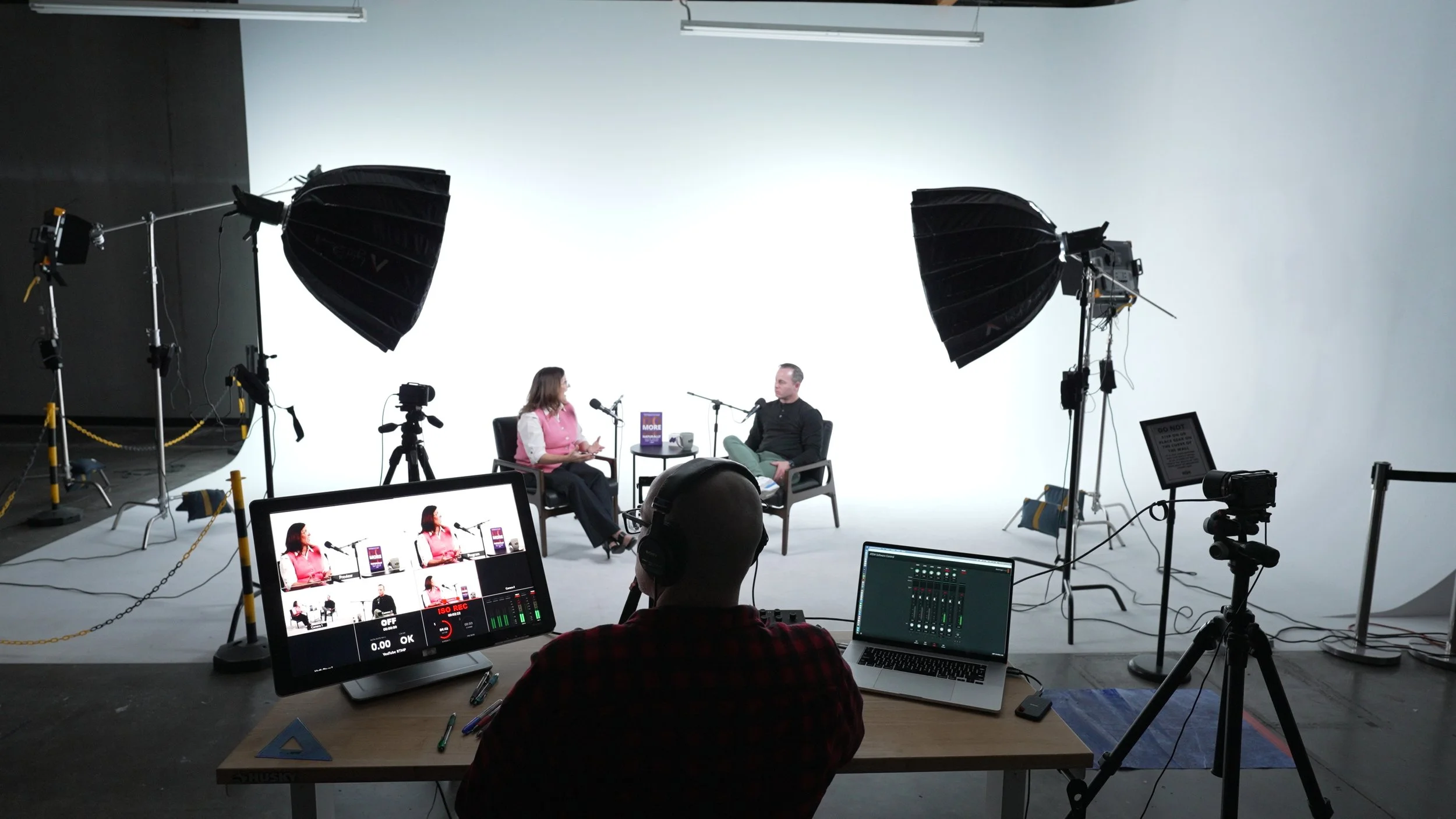
When you're ready to produce a show with the same quality as some of the most popular podcasts out there, with multiple angles, clean cuts between speakers, and the kind of visual production value that builds immediate credibility, then it’s time to get a video switcher.
Think of a video switcher as a capture card that accepts multiple camera inputs simultaneously. Each camera connects to the ATEM via HDMI, and the ATEM connects to your computer via USB-C. Once connected, it appears as a single camera input that you can control in real time. You can even cut between angles live during recording, and overall, you can create a viewing experience that rivals professionally produced shows.
This level of setup requires more coordination, camera placement, lighting for each angle, and managing the switcher during a live conversation. This may seem a lot more complex, but the result is content that looks polished enough to stand alongside the most popular Apple Podcasts. For entrepreneurs, photographers, and brands using podcasting as a core part of their content strategy, this kind of production value is a competitive advantage. At first glance, your audience will know to take your words seriously.
Related: The Real Value of Renting a Video Production Studio in Phoenix —The Hive Studios
Need some extra help?
Here's something worth considering: for many creators, the smartest first move isn't buying any gear at all. It's recording your first episodes or your first season in a fully equipped podcast studio rental in Phoenix, where everything from the microphones to the lighting to the camera is already set up and ready to go.
Podcast studio rental in Phoenix
IThat's exactly what The Hive Studios is built for. As a Phoenix content creation studio designed specifically for podcasters, photographers, and video creators, The Hive gives you access to professional-grade production gear, including the full multi-camera and audio setups described in this guide, all without the upfront investment, the learning curve, and the ongoing maintenance that comes with owning it all by yourself.
Beyond podcasting, The Hive Studios also serves as both a fully equipped Arizona photography studio and videography space, making it the go-to destination for Arizona photoshoots, brand content, headshots, and creative productions of all kinds. Whether you need a podcast recording session, a brand photoshoot, or a full content day that covers both, the studio is built to handle it all under one roof.
Contact us today if you have any questions at all, or book your podcast studio rental time slot conveniently through our website.